
For a long time, ingestion into our familiar data lakes and unity catalog experience was done using a confusing mishmash of partner software (ADF, Fivetran, Matillion, custom python scripts). This quickly became an integration and tech debt nightmare, with various orchestrators, logging systems, IDs from different pipelines, and so on. Recently, Databricks have been quickly releasing more and more managed connectors for Lakeflow Connect (search “connector” on this page).
But what about ingesting from various arbitrary API sources? Databricks’ solution to this is Community Connectors, which allow you to use the same familiar managed connector framework to ingest almost any possible source of data. So long as the data can be pulled using regular Python, it can be transformed to fit into the connector framework. This is just another step towards bringing all your ingestion from scattered, disconnected software all into a single place with unified governance and orchestration.
The Databricks ecosystem already boasts a huge number of features (listed below), so bringing everything into one place really amplifies the ease of use from an engineering perspective.
Databricks features
Centralised management: connector logic and ingestion managed within Databricks, reducing reliance on separate technologies.
Lakeflow Spark Declarative Pipelines: use connector logic to run API ingestion pipelines.
Documentation and examples: in-depth guidance from Databricks and the wider community.
Reusable connector structure: makes connectors easier to understand, build, review, maintain, and extend.
Unity Catalog features
Data governance: ingested external data is governed through Unity Catalog.
Consistent treatment of tables: external-source data is treated like other source tables.
Central destination for ingested data: API data is ingested into Unity Catalog tables.
Optimisation visibility: inspect applicable settings and operations, such as liquid clustering and predictive optimisation, where supported and configured.
Access visibility: review grants to users, groups, and service principals in the permissions view.
Data lineage: explore lineage for the published destination table.
Lakeflow Jobs features
Scheduling: configure when the ingestion pipeline runs.
Retries: configure job-level retries to help recover from failed runs.
Notifications: configure job-level notifications to stay informed about runs and failures.
Table inspection: use Catalog Explorer to inspect columns and data types, preview records, and review table properties and history, depending on your permissions.
Pipeline monitoring and debugging: inspect node status, failed tables and flows, error messages, and logs in the pipeline UI.
Targeted recovery: trigger another pipeline update after resolving an issue, or use Refresh failed tables to retry failed tables and their downstream dependencies without refreshing tables that already succeeded.
Community Connectors are officially in Beta (see here), so they require enabling in workspace preview settings, and SLAs are not guaranteed or stable.
How Community Connectors Work
Imagine we were trying to extract earthquake data from the USGS API. We might write a Python script or scheduled ingestion job to call the API and retrieve the records. But that would only be the beginning. We would also need to handle pagination, retries, checkpointing, and decide whether each run should append records, replace a snapshot, or update existing records. We would then need to deploy and monitor that job separately, before writing the results into a data platform.
A Community Connector does not remove the API-specific work. We still need to write the logic for calling the USGS API, handling its pagination, and interpreting its responses. However, instead of building a complete ingestion framework around that code, we implement a small number of standard methods on the LakeflowConnect interface.
The core methods of a LakeflowConnect class are:
list_tables returns a list of available tables in your source.
get_table_schema defines the Spark schema for a given table’s records.
read_table_metadata provides primary keys, ingestion type, and cursor field for a table.
read_table retrieves records and returns an updated offset for incremental ingestion.
read_table_deletes (optional) retrieves records that should be deleted from previously ingested data.
Settings for reading tables like filters or page sizes are defined in a pipeline created by Databricks which are accessed by connector methods as the table_options parameter.
Once those methods are defined, Databricks can take care of much of the repetitive ingestion work automatically. Lakeflow can apply schema enforcement and type handling, maintain incremental checkpoints, perform key-based merges and upserts for CDC, execute append-only writes, reconcile snapshots, and detect deletes when the source or ingestion mode supports them.
Building the USGS Earthquake Connector
To illustrate how the connectors work, I will give some example code using data from the free, publicly accessible USGS Earthquake API. We will walk through each of the core methods for a Lakeflow Community Connector and see how they can be implemented.
It’s worth reading through the official GitHub repository quick-start. If you want to go further, it also contains custom-built AI agent skills that can help you build a connector while following the library’s rules.
You can also follow along with this example, using our fork of the community connectors repo (found here).
We create a connector class in src/databricks/labs/community_connector/sources/<source> that inherits from LakeflowConnect. This gives the connector the standard interface that Lakeflow expects, while allowing
# USGSConnector.py
class USGSConnector(LakeflowConnect):
    def __init__(self, options: dict[str, str]) -> None:
        """Initialize with connection parameters"""

    def list_tables(self) -> list[str]:
        """Return names of all tables supported by this connector."""

    def get_table_schema(self, table_name: str, table_options: dict[str, str]) -> StructType:
        """Return the Spark schema for a table."""

    def read_table_metadata(self, table_name: str, table_options: dict[str, str]) -> dict:
        """Return metadata: primary_keys, cursor_field, ingestion_type
        (snapshot|cdc|cdc_with_deletes|append)."""

    def read_table(self, table_name: str, start_offset: dict,
                   table_options: dict[str, str]) -> (Iterator[dict], dict):
        """Yield records as JSON dicts and return the next offset
        for incremental reads."""

    def read_table_deletes(self, table_name: str, start_offset: dict,
                           table_options: dict[str, str]) -> (Iterator[dict], dict):
        """Optional: Only required if ingestion_type is 'cdc_with_deletes'."""
The abstract base class acts as a contract for each connector, while the standard structure provides a familiar scaffold for new implementations. This is the basis of the framework from which all community connectors are built, and is where the majority of the “work” (non-boiler-plate) is required. All depending on the complexity of the relevant API of course!
Table Schema & Metadata
list_tables needs to return a list of the available tables. There is only one, which is hardcoded in the variable EARTHQUAKES_TABLE:
EARTHQUAKES_TABLE = "earthquakes"

def list_tables(self) -> list[str]:
    """Return the supported table."""
    return [self.EARTHQUAKES_TABLE]
get_table_schema needs to return the column names and data types that the connector will output. This is hardcoded in the variable EARTHQUAKES_SCHEMA
def get_table_schema(
    self, table_name: str, table_options: dict[str, str]
) -> StructType:
    """Return the fixed USGS earthquake schema."""
    self._validate_table(table_name)
    return EARTHQUAKES_SCHEMA
EARTHQUAKES_SCHEMA = StructType(
    [
        StructField("id", StringType(), nullable=False),
        StructField("mag", DoubleType(), nullable=True),
				...
        StructField("sources", StringType(), nullable=True),
        StructField("types", StringType(), nullable=True),
        StructField("mag_type", StringType(), nullable=True),
    ]
)
read_table_metadata needs to return data on the primary key(s), cursor field (incremental tracking), and ingestion type:
def read_table_metadata(self, table_name: str, table_options: dict[str, str]) -> dict:
    """Return CDC metadata keyed by USGS event id and updated timestamp."""
    self._validate_table(table_name)
    return {
        "primary_keys": ["id"],
        "cursor_field": "updated_at",
        "ingestion_type": "cdc",
    }
Here, we use change data capture (CDC), but many other forms of ingestion are available through the Community Connectors package. Here are some examples. It’s worth fully understanding the intended use pattern and limitations of the API you’re trying to ingest from before choosing which incremental method to use.
read_table implements the call to read data from the external source and returns it to Lakeflow. This is the most source-specific method, so its implementation will vary significantly between connectors. It also returns an updated offset so Lakeflow can keep track of incremental reads.
def read_table(
    self, table_name: str, start_offset: dict, table_options: dict[str, str]
) -> tuple[Iterator[dict], dict]:
    """Read events updated since the previous offset."""
    self._validate_table(table_name)
    params = self._build_query_params(start_offset, table_options)
    payload = self._request_geojson(params)
    records = [_feature_to_record(feature) for feature in payload.get("features", [])]
    records = [record for record in records if record["updated_at"] is not None]
    if start_offset and start_offset.get("updated_after"):
        start_cursor = start_offset["updated_after"]
        records = [
            record for record in records if record["updated_at"] > start_cursor
        ]
    records.sort(key=lambda record: record["updated_at"])

    if not records:
        return iter([]), start_offset or {}

    return iter(records), {"updated_after": records[-1]["updated_at"]}
Metadata Files
__init__.py imports the created class:
"""USGS earthquakes connector."""

from databricks.labs.community_connector.sources.usgs_earthquakes.usgs_earthquakes import (
    UsgsEarthquakesLakeflowConnect,
)

__all__ = ["UsgsEarthquakesLakeflowConnect"]
connector_spec.yaml sets base_url as a connection parameter so it can be changed when creating a connection. The external_options_allowlist provides a list of possible parameters that enhance the query and can be adjusted after pipeline creation.
display_name: USGS Earthquakes
connection:
  parameters:
    - name: base_url
      type: string
      required: false
      description: >
        Optional override for the USGS FDSN Event query endpoint.

external_options_allowlist: >
  lookback_days,limit,min_magnitude,event_type,min_latitude,max_latitude,
  min_longitude,max_longitude
pyproject.toml gives an overview of this package, providing a description, required Python version, and required dependencies. This is usually generated with uv or your package manager of choice.
Choosing an Ingestion Type
The ingestion type defines how records are applied to the Unity Catalog destination table. It is defined per table in read_table_metadata.
Choosing an ingestion type depends on whether the source provides its current state, only new records, record updates, or information about deleted records.
Snapshot
Snapshot ingestion should be used when a read returns the whole current state of the source table.
Lakeflow compares snapshots to the current table and applies the differences. New records are added, changed ones are updated, and any that are missing are deleted.
This is good for when a source can't output incremental change and the dataset is small enough to repeatedly request the whole thing.
Append
Append ingestion can be applied when records are immutable, and data is only ever added to the table.
The connector has an offset that is used to retrieve all new records since the last ingestion run. Lakeflow appends all of those records to the destination table without matching against existing rows as this is intended for immutable records.
Append is useful when a source’s records never change, such as event logs.
CDC
Change data capture supports both new records and updates to existing records.
The connector is implemented similarly to append, using the offset to retrieve new records. The difference is that Lakeflow will use the primary key(s) defined by read_table_metadata to decide whether records should be inserted or used to update existing data.
CDC was chosen for our source as records provide an update timestamp that could be used to update the magnitude of already recorded eathquakes, or insert newer records.
CDC With Deletes
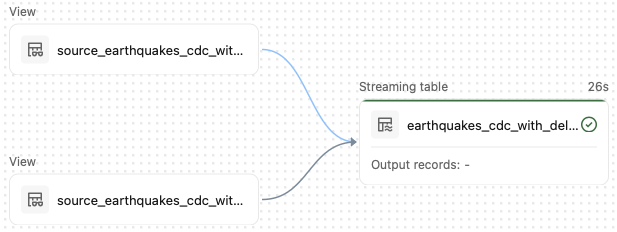
CDC with deletes extends CDC to allow ingested records to be removed.
This ingestion requires implementing the read_table_deletes method which will return the primary key(s) for the data that needs to be deleted. The pipeline will run a different flow for upserting and deleting records.
Viewing within the UI
In this section, we’ll walk through the Databricks UI and show how to explore the connector and its ingested data. To follow along, clone our GitHub repository and follow the CLI deployment instructions in the USGS Earthquakes connector README. This will set up the example connector and ingestion pipeline in your own Databricks workspace, so you can explore the UI, query the earthquake data, and experiment with the connector as we work through the examples below.
Once deployed, the selected source table appears as a streaming table within Lakeflow Spark Declarative Pipelines, just as it does in other Databricks pipelines. Engineers can use the same UI and framework they already use to ingest data from Delta Lake, database sources, or Delta Sharing to ingest data from arbitrary API sources:
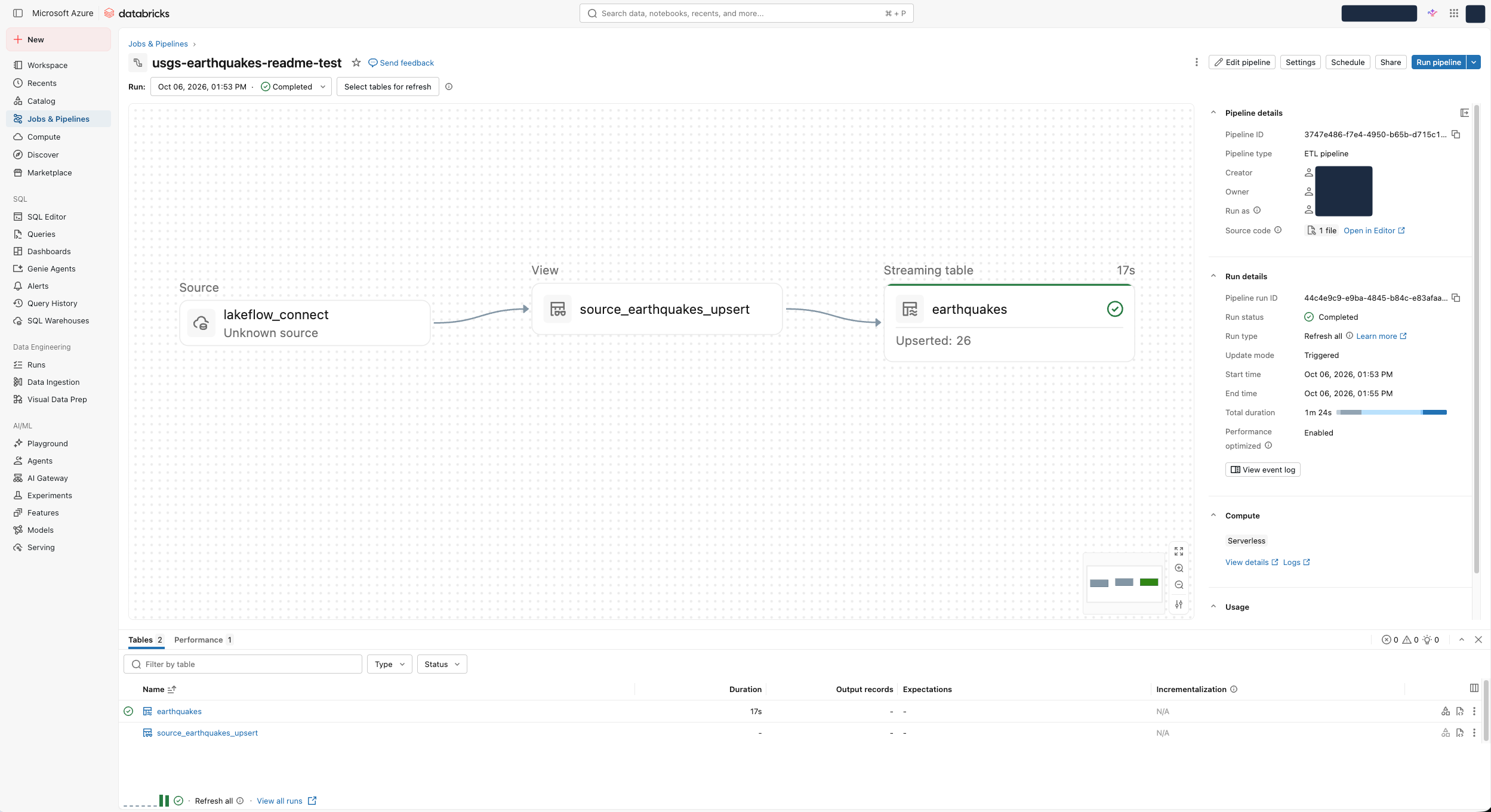
This gives us access to Databricks’ suite of monitoring and debugging tools. We can view the status of each node in the pipeline graph and investigate issues. Selecting a node lets us inspect it; however, the graph’s code navigation is not available for the view in this wheel-based deployment. The connector and framework code can instead be reviewed in the repository links below.
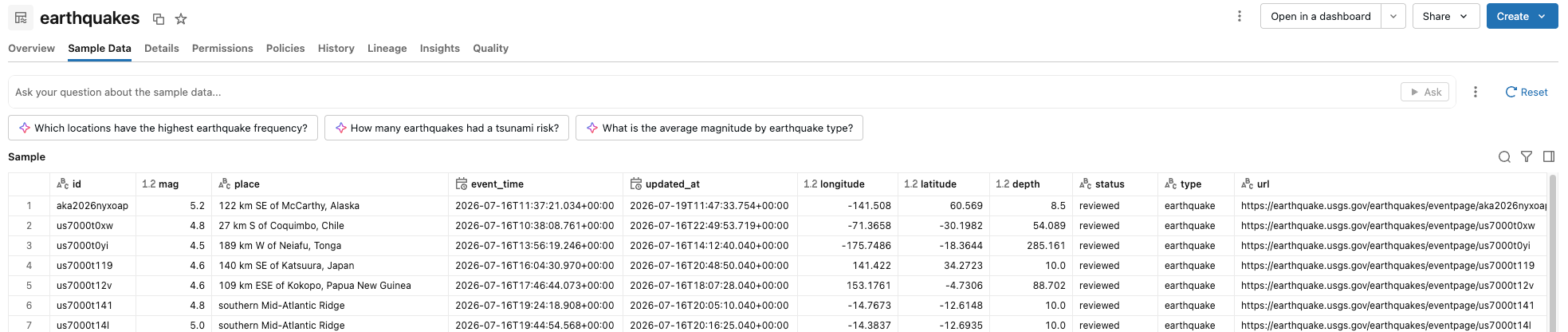
For instance, selecting the final streaming table, called earthquakes, lets us inspect the table created using data from the USGS Earthquake API.
Next, looking at the view in the middle, we can see the step labelled source_earthquakes_upsert. This view is created by the shared Community Connectors framework, specifically ingestion_pipeline.py. The Lakeflow Spark Declarative Pipelines code defines ingestion behaviours such as CDC and append. This acts as an intermediate step between the source and the earthquakes streaming table.
Finally, the source node on the far left is labelled lakeflow_connect and Unknown source. This is the generic Spark source used by the Community Connectors framework, not a separate source table. The USGS-specific Python code sends GET requests to the USGS Earthquake API and retrieves the data; this code is defined in the usgs_earthquakes.py file in our repository.
Looking at the pipeline as a whole, the flow starts on the left with the generic lakeflow_connect source, which calls the USGS-specific connector code in our repository. Data then passes through the intermediate view, where CDC and other ingestion behaviours are defined by the shared framework using Lakeflow Spark Declarative Pipelines. Finally, the data is written to the streaming table. This is the entry point for users querying the ingested data. It can serve as a bronze-layer table, though this CDC table keeps the latest state per event ID rather than an immutable raw history.
Conclusion
Community Connectors let us define ingestion for APIs that do not have an existing connector, using Python to control how requests are made and responses become records. Rather than building the entire ingestion engine ourselves. The framework uses the schema and metadata we provide to apply records through snapshot, append, CDC, or CDC with deletes, according to what the source can reliably support.
The takeaway is that a Community Connector does not eliminate the need to understand an API. It lets us focus that work on extracting records correctly and choosing ingestion semantics that reflect the source’s behaviour.